
Orna bot: a solution for automatic farming on a videogame, involving color theory
I don't like slow, endless farming in games. Do you? This is a small and harmless bot I made for Orna, a "Pokemon Go"-like game with an RPG twist.
The Game
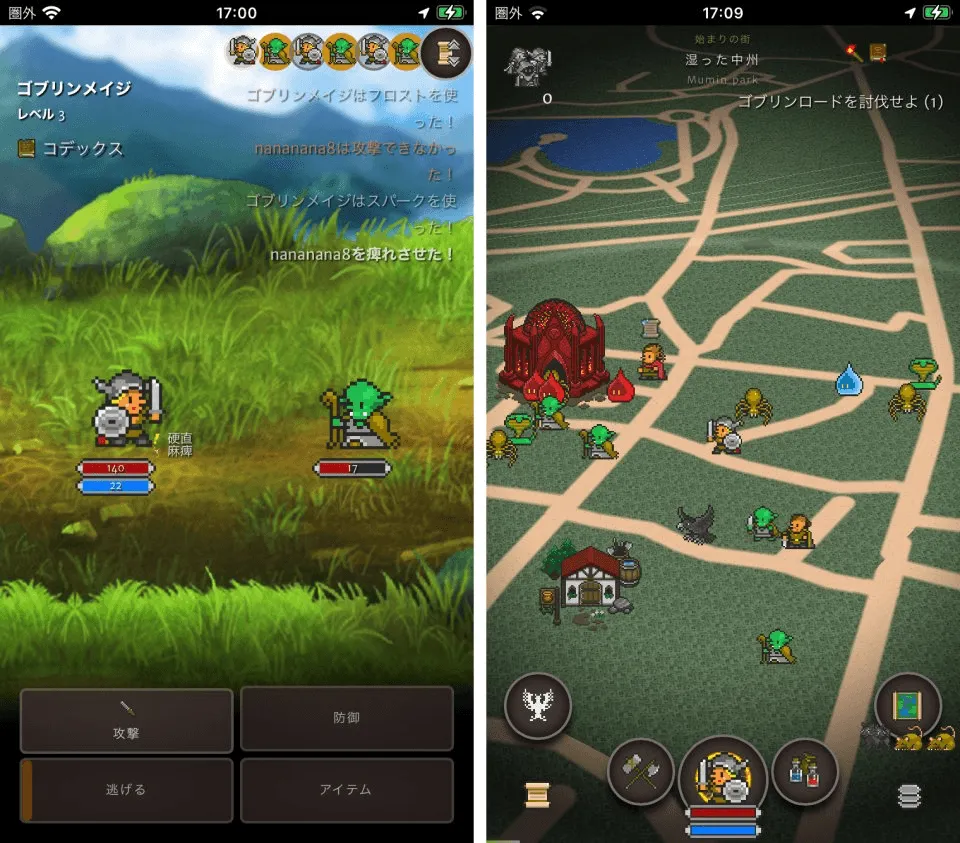
Orna is a GPS-based game (like Pokémon Go) that plays like a classic RPG. You get the usual gameplay: explore, kill monsters, get loot, level up, improve your character, choose a class… etc. I really encourage you to try it; it has given me countless hours of fun on the street with my friends and at home by myself.
The Elephant in the Room… Are you cheating?
Well, yes… but it’s harmless. I’m the first one who opposes cheating in games, botting, and such, but this is a bit of a different case. The game is mainly PvE, with PvP mechanics that are optional and unranked. And there is pretty much no “competition” in PvE, so improving your character by playing a lot (or by automating farming) does not affect other players.
Either way, this post is not about encouraging anyone to try to cheat in this or any other game, it is just to talk about how I implemented a solution.
The Problem; Eternal Farming
I found myself in a bit of a loop: I was at a level where, if playing from home, I wasn’t able to do much or advance much. Killing monsters was easy and quick, but repetitive. And something like that usually itches my brain in a peculiar way. After a while of doing A, then B, then C… I thought to myself… what if I automate this?
So orna-bot v1 was born.
Orna bot, the first iteration, 2022.
I wanted to do something quick, easy, and dirty: a bit of a POC and a way to test if I could do this myself. It turned out to be a fantastic, crazy project where I learned a lot. About colors. Yes. Don’t let me get ahead of myself.
First of all, the platform. I didn’t want to meddle with Android too much; a couple of quick Google searches made me realize that, obviously, Android doesn’t want any app making “touches” on the screen just like that. It seemed like a lot of work to do so, and I had another idea.
Sometimes, when playing from home, I would use scrcpy, a program from Genymotion that allows a user to plug their phone into a PC via USB, see the screen, and allow touches from interacting with the window. It was the perfect platform for this first test.
With this, I could use Python to find the window, analyze it, and send clicks easily.
The plan was simple: look at the screen, locate the monsters, click on one, enter combat, kill it, heal, and start again. But… how?
Enter: Color Theory
First, let’s find a monster. Yes, they appear “sort of” in the middle, “around” an area… but to see the whole area at the same time, the monster icons get too small and you could easily miss them… what then?
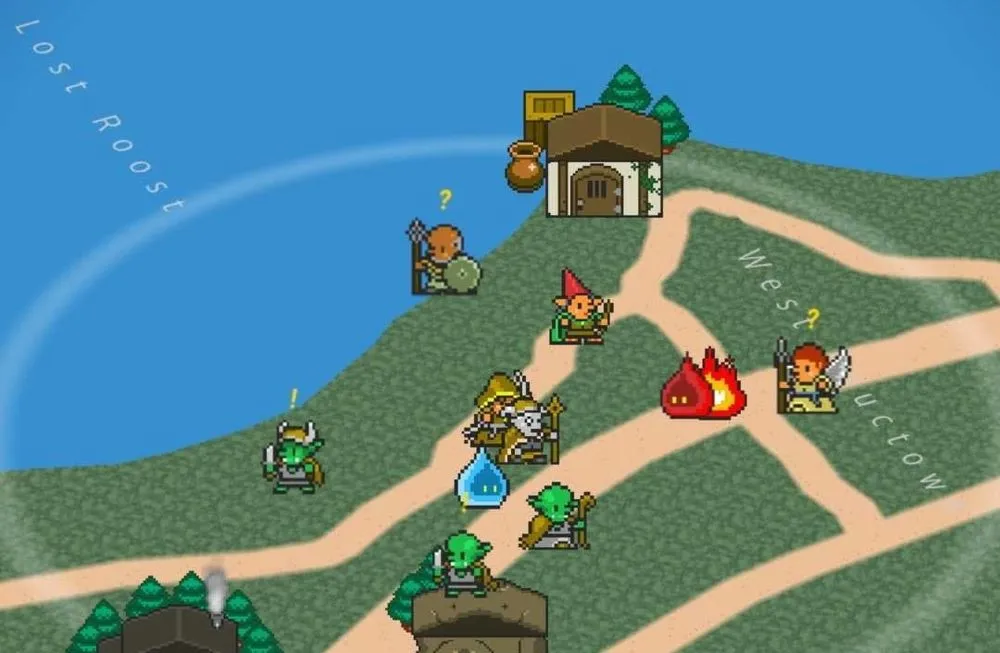
Not gonna lie, it took me a while to realize what my brain was trying to say: you can easily tell where the monsters are by their color. But what about that? I tried to discern it a bit, tried multiple ranges… I had to get a bit more information about colors to understand the answer: the colors weren’t special.
The saturation was.
Yes, yes, it may seem simple or trivial to you, but remember that I’m a backend developer, alright? I’ve got zero idea about design, color theory, and such.
As soon as I realized it, it was easy: take a screenshot of the window, cut only the specific section of the image where monsters appear, get the HSV (color values) of each pixel, and filter. There is no need to find the exact model of a monster, its shape, or anything like that. A bunch of right pixels would do.
You can see here the base image and the results I got in one of my early versions (sorry for the low definition).
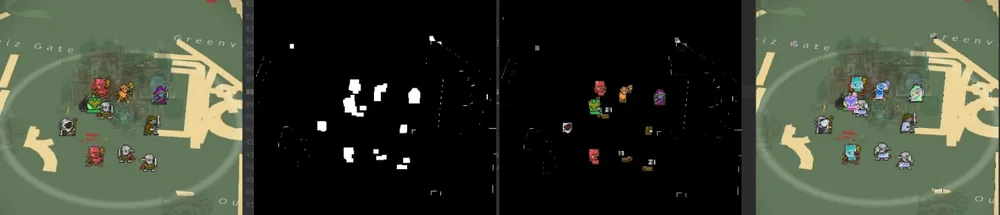
Once I got that refined to a point where I knew I had only the pixels where monsters were, it was as simple as clicking randomly on one of those and entering combat.
The Loop: a Stateless Approach
With that part done, I had to make a few checks: am I in the world view? What is the game doing? Where can I click? I decided the best for this version was to make the program agnostic to previous states: for each loop, we analyze the screen, decide where we are, and act accordingly.
Therefore, implementing the logic was pretty easy.
- If we are on the main screen, look for a fight.
- If we are in a fight, fight!
- If we won or lost the fight, then come back (heal if we lost!) You get the idea.
I didn’t want to hardcode coordinates for buttons, so to find them (like the attack ones) and help me define where we were, I used OpenCV to look for the image of the button on the screen.
The brute idea was: take a screenshot, cut the image around where I knew the button I wanted to locate could be, and try to locate said image on the screen. Although it may seem a bit dumb, knowing where the buttons would appear beforehand made these checks pretty quick and efficient.
I ended up implementing better logging, a statistics console view (with kill count, death count, and exp earned), randomness to avoid getting caught (I was probably violating the ToS), and validation of corner cases. In the end, it was a fun little experiment that ran surprisingly well, but that I let go after some months as I had to keep my computer on and a phone plugged in to run. That was going to change for v2.
Here you can check out a video I sent a friend, showing the bot running:
Orna Bot 2, Let’s Do It Right This Time
In 2025, I got back to Orna a little bit and soon remembered my project. As the original challenges were already known to me, I decided that I would tackle the worst aspect of the previous version: having to have my computer plugged in to the phone to execute the script.
The main challenge now was how to read the screen and allow the application to generate clicks on Android. After a bit of tinkering, I got the first tests working: using the Accessibility Service from Android, I could give access to the app to do all those things. It still was a bit of a pain in the ass, but I think it was more about my inexperience in Android than about the implementation itself.
Oops… I Entered The Backend Domain
This project was written in Kotlin, so my backend senses kicked in to implement something a little bit more standard and with best practices in mind. You know: different architecture layers, domain for logic, infra for third-party tools, dependency inversion… the works. This last one was pretty useful early on as I tested different approaches to how to read the screen; ultimately, I went for Tesseract, reading text instead of images.
I wasn’t going to port the Python version to Android… I wanted to improve upon it.
.
└── ornabot/
    ├── domain/
    │   ├── screen/
    │   │   ├── reader/
    │   │   └── touch/
    │   └── strategy/
    ├── infra/
    │   └── screen/
    │       ├── capture/
    │       │   └── android
    │       ├── reader
    │       └── touch
    ├── ui/
    │   └── theme
    ├── AutomationActivity.kt
    ├── MainActivity.kt
    └── res/
Friendship with Stateless ended, now Strategy is my best buddy
I didn’t want to implement a stateless machine like the first iteration; I wanted something a bit more refined and standard. I decided to implement a Strategy pattern: each pattern that implemented the main Strategy() ran a check: is this my screen? If so, execute my actions, else, leave it be. That implementation made it easier to add other strategies without modifying the automation layer.
interface Strategy {
    fun matches(state: GameState): Boolean
    fun execute()
}
This was useful as I implemented a way to fight regular monsters, and a way to fight on Raids (big monster fights that could take from a couple of minutes to 20m easily, where strategy had to be radically different). I also implemented Fishing! Because why not, it was a nice mechanic and a useful one to find loot.
class CombatStrategy(
    private val touchService: TouchService,
    private val ocrService: OCRService
)
I took a bit of a TDD approach to code: I would take a couple of screenshots of the game, and build the Strategy code around them, adding more and more cases so I could be confident that, with the right configuration, the app always knew where it was, and what the next actions were.
Ironically, generating touches wasn’t the hard part. Understanding what the game was showing was. Colors were still useful to locate monsters, but once inside menus and combat, OCR with Tesseract turned out to be a much more reliable way to infer the current state.
The result was amazing: now I could even carry my phone with me when I was out of the house, put it in my pocket and let it farm.
Did I do it? A couple of times.
Was most of my time spent closely watching how my bot ran autonomously, with wonder in my eyes…?